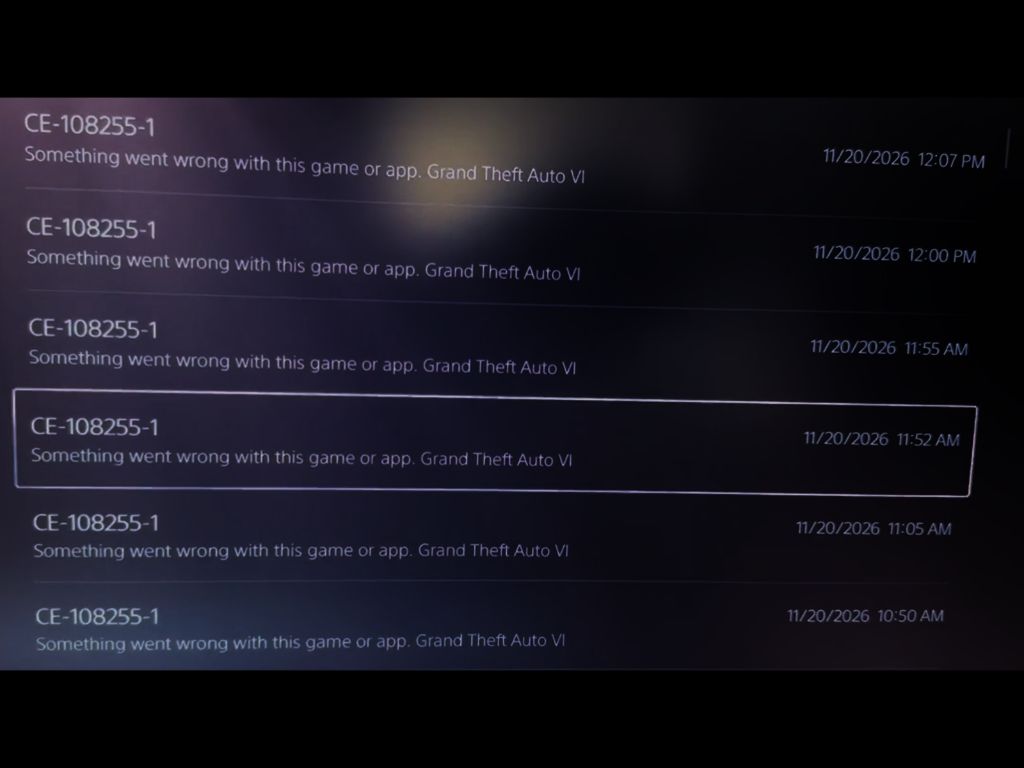
Ten years of waiting, and then this: Since the release of GTA 6 on November 19, PS5 players have been reporting repeated crashes with error code CE-108255-1. According to reports, the standard PS5, PS5 Slim, and PS5 Pro are all affected. For some, the game crashes immediately upon launch, while others can't get past the opening cutscene, leaving them stuck in the story. There is no official fix available yet.
When does GTA 6 crash with CE-108255-1?
The pattern is not uniform. Crashes occur when starting the game, on loading screens, during the opening cutscene, and at specific points in early story missions. Each time, the console returns to the PS5 home screen and displays the same error. One Reddit user, according to IGN, describes their game freezing on Jason's loading screen, while others can at least play for a few minutes. Another player states they cannot get past the opening cutscene. If they skip it, the game freezes shortly after.
Important context: According to IGN, the problem does not affect the majority of players. However, those who experience it often do so frequently and without any discernible trigger. With GTA 6's auto-save already criticized as stingy, every crash means additional lost progress.
What are Sony and Rockstar saying about the error?
Alarmingly little. Code CE-108255-1 is not a GTA-specific error, but a general PS5 crash message. The official PlayStation error code page merely states that an error occurred while running the game or application, with a reference to PlayStation Repairs. According to Notebookcheck, Sony's only concrete recommendation is to update the game.
Rockstar provides even less information. The troubleshooting article for GTA 6 in Rockstar Support was last updated on November 18, according to Notebookcheck, and only links to Sony and Microsoft's error code pages. There is no patch for CE-108255-1, nor is there a statement.
The result is a classic support ping-pong: those who contact PlayStation are referred to Rockstar, and those who write to Rockstar are sent back to Sony. One player, according to IGN, feels trapped in an “endless support loop” with a game they paid for and cannot play. Others report that their tickets were simply closed.
These are the solutions players are suggesting
To be clear upfront: There is no guaranteed fix. The following steps come from Sony's advice and player reports compiled by IGN and Notebookcheck. They have helped some, but not many.
- Update game and system software: This is Sony's official recommendation. Check if GTA 6 and the PS5 firmware are up to date.
- Restore licenses: According to IGN, some players had success with this. You can find the option in the PS5 settings under Users and Accounts.
- Uninstall and reinstall: Also successful for some, according to IGN. Given the size of the game, however, this is a significant time commitment.
- Clear cache and rebuild database: Often recommended, but did not reliably help in the cited reports. One player writes that they tried clearing the cache, rebuilding the database, reinstalling, updating, and restoring licenses, but the crash still persists.
- Turn off HDR, set resolution to 1080p: One player also tested this, according to IGN, without success.
- Contact support: Report the error to PlayStation and Rockstar anyway. The more documented cases there are, the harder it will be to ignore the problem.
Defective PS5 or broken game?
This is precisely what remains unclear, and opinions diverge here. A Sony support employee quoted one player $230 USD before taxes for a repair, according to Notebookcheck, while another employee spoke of a clear software problem. A player who switched to a replacement PS5 Slim reported no crashes in the first five hours. Gizmodo, according to Notebookcheck, suggests liquid metal as a thermal conductor, which can dry out over time. However, other games apparently run without issues on the affected consoles. It is notable that PS5 models from the launch period are said to be particularly frequently affected, but there are also reports from Slim and Pro owners.
Our assessment: Before you invest $230 in a repair, you should wait. As long as neither Sony nor Rockstar provides a cause, and the same consoles handle other games cleanly, an expensive hardware repair is a gamble that may not solve the problem. A patch from Rockstar is likely for a game of this size in the first few weeks anyway, but there is no guarantee. Especially with a launch that, according to IGN, generated $3.79 billion on the first day, the silence from both companies is difficult to comprehend.
If you want to read up on everything that comes with the launch, you can find the key data in our release report for GTA 6 with a 210 GB download and 70 to 80 hours of story. And why GTA 6 remains at 30 FPS even on the PS5 Pro, we have also documented. All official information about the game is available on the GTA 6 page from Rockstar.
Source: PlayStation Support, IGN, Notebookcheck
Is your PS5 also stuck with CE-108255-1, or is GTA 6 running smoothly for you so far?

Comments (0)
No comments yet — be the first to share your take.